How to Create a Room?
To get started, click on the Organize tab.
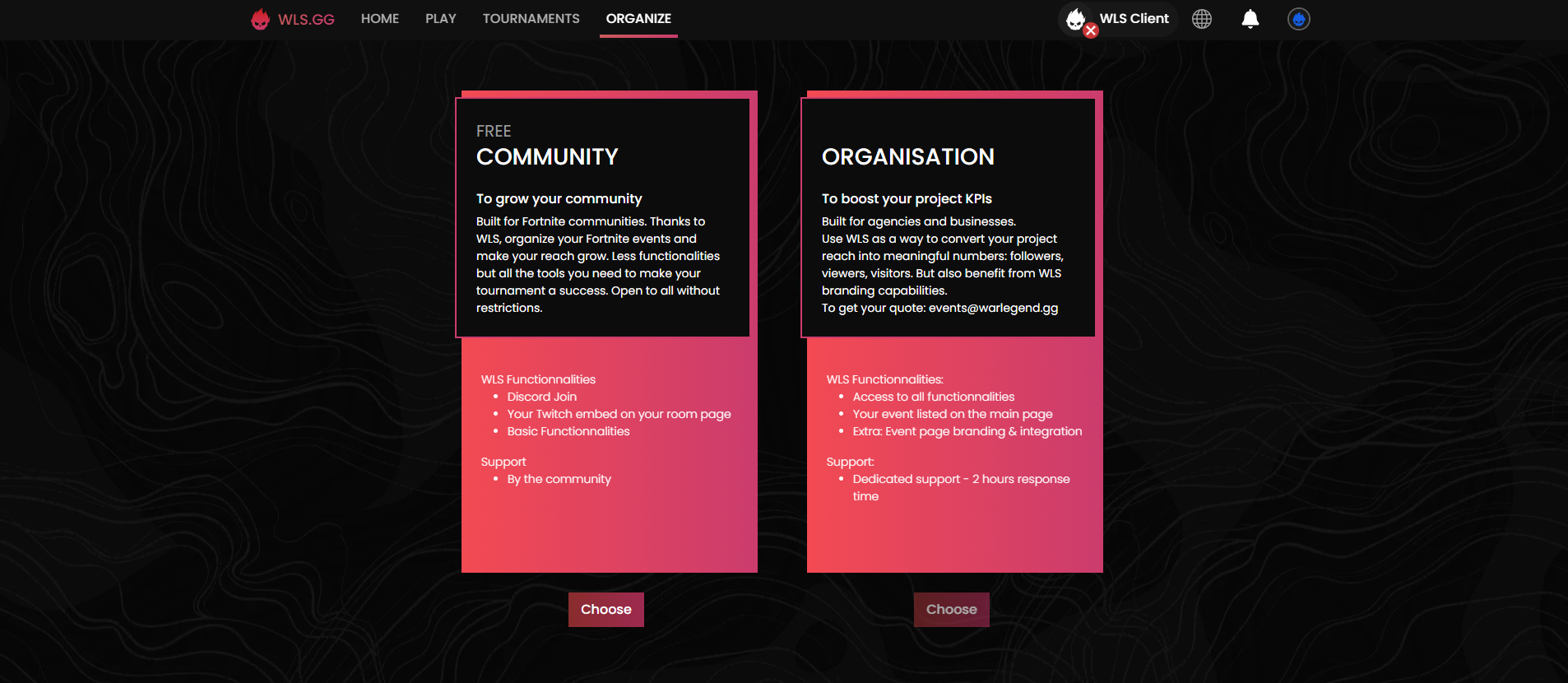
Tournament Type Selection
Two options are available to you:
Free
To develop your community
Designed for Fortnite communities. With WLS, organize your Fortnite events and expand your reach. Fewer features, but all the necessary tools to make your tournament a success, open to everyone, without restrictions.
Included features:
- Maximum one session per tournament page
- Unlimited number of players
- Participation conditions only via Discord
- Community management
Paid
To boost your project's KPIs
Designed for content creators and businesses. Use WLS as a way to transform your project's reach into concrete data: subscribers, viewers, visitors. Also benefit from WLS's branding capabilities.
Advanced features:
- Highlighting your tournament on our platform in the "Tournaments" tab
- Multiple sessions on the same tournament page
- Ability to automatically qualify players to another session
- Customization of your tournament page (description, poster)
- Unlimited number of players
- Participation conditions with your social networks (Twitch, TikTok, Twitter, Instagram, etc.)
- Ability to highlight the stream of your choice during the tournament
- Support/Management provided by a WLS Admin or community admin
For a quote: [email protected]
Tournament Mode Selection
To create a tournament page, select "Free Community":
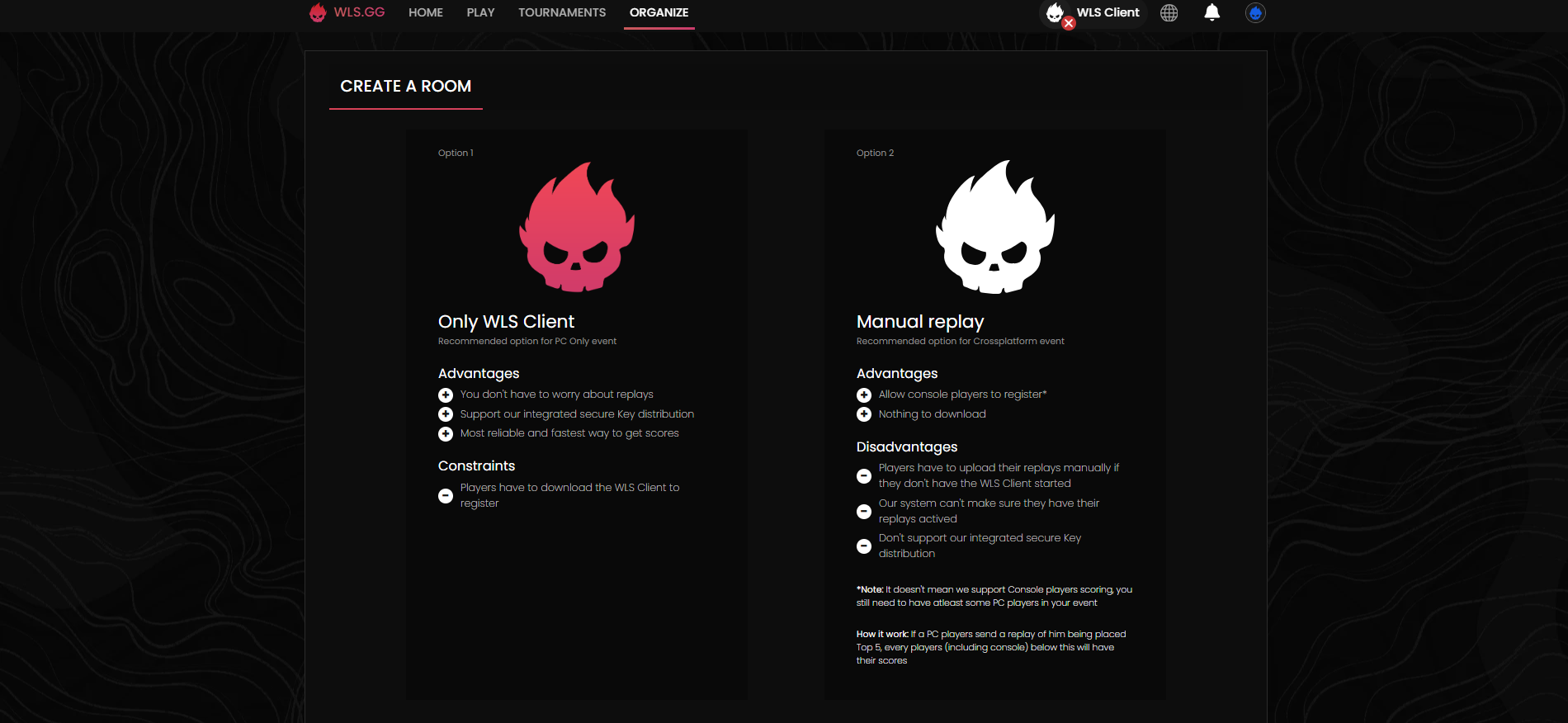
You will have two options:
- Option 1 - WLS Client Only: Tournament with PC players only
- Option 2 - Manual Replay: Multi-platform tournament
- We let you read the advantages and disadvantages of the two different options. The configuration of Option 1 or 2 will remain the same.
Room Configuration
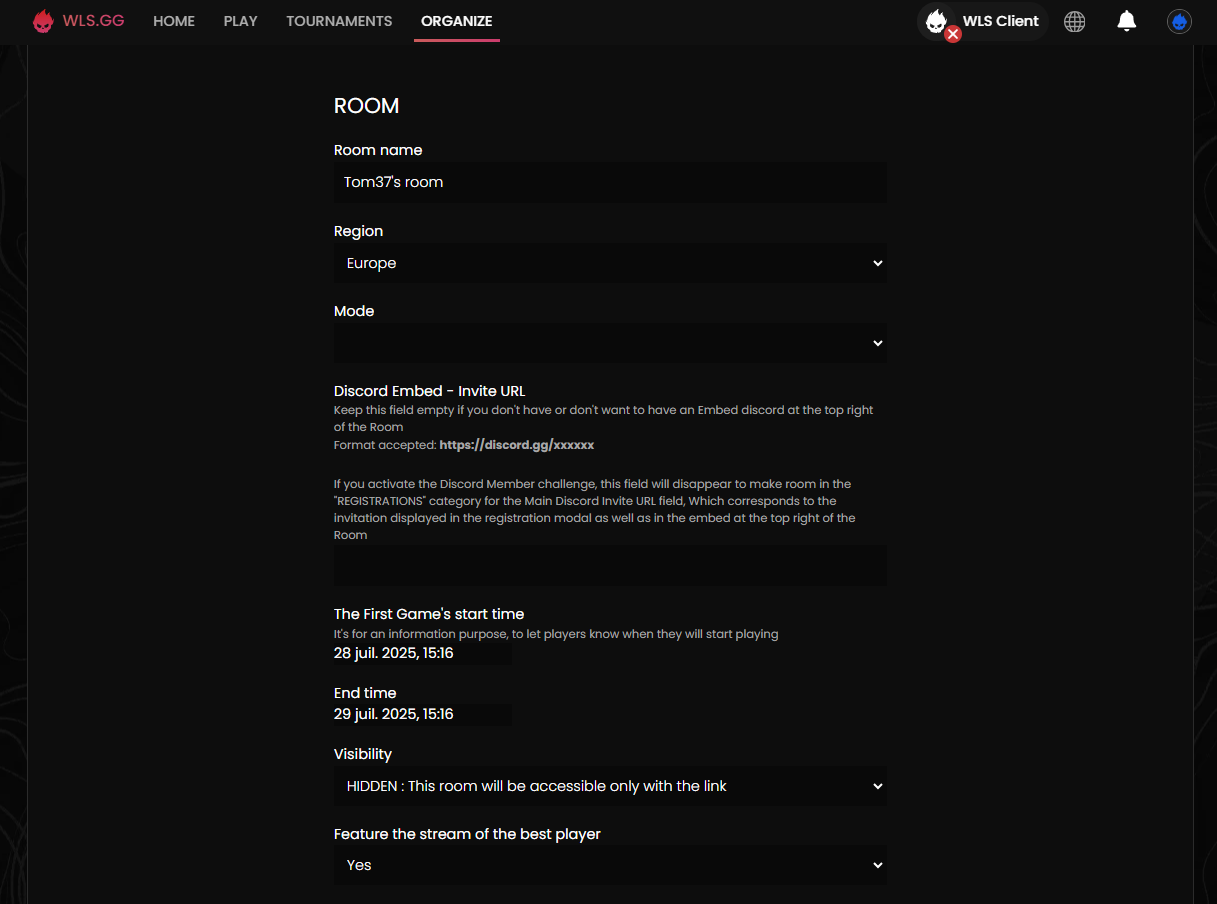
Room Name
You must choose the name.
- Please note that you are limited to 35 characters.
Region
You must choose the Region:
- Europe
- NAE
- NAW
- Asia
- Oceania
- Middle East
- Brazil
- Onsite
Game Mode
| Category | Available Modes |
|---|---|
| Battle Royale | Solo / Duos / Trios / Squads |
| Battle Royale Tournament Settings | Solo / Duos / Trios / Squads |
| Zero Build | Solo / Duos / Trios / Squads |
| Zero Build Tournament Settings | Solo / Duos / Trios / Squads |
| Reload Build | Solo / Duos / Squads |
| Reload Zero Build | Solo / Duos / Squads |
You will not be able to change the game mode once the page is created!
Discord Invitation URL
You can choose to leave this field empty or fill it with a Discord invitation link.
- Please note that only this format is allowed --> https://discord.gg/xxxxxx
First Game Start Time
Select the tournament start time to indicate to players when your tournament begins.
End Time
Select the end time of the last tournament game to indicate to players when your tournament will end.
Visibility
Select one of the following options:
| Option | Description |
|---|---|
| HIDDEN | This Room will only be accessible with the link. |
| PUBLIC | This Room will be listed on your user page. |
Registration
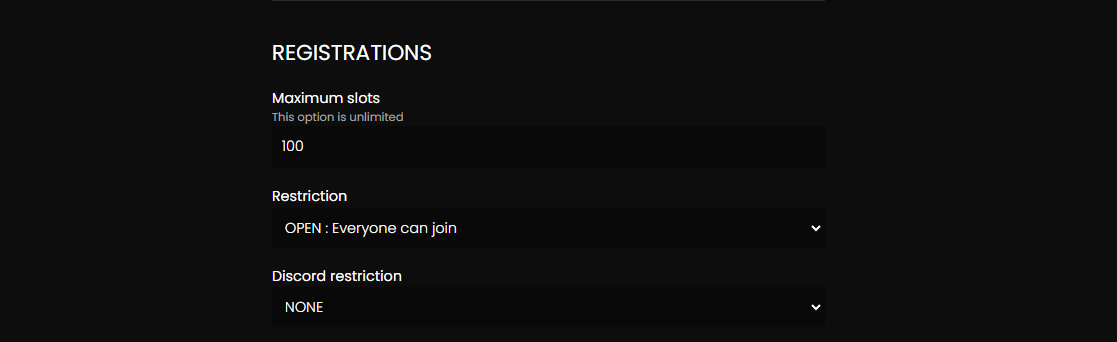
Maximum Number of Spots
You must choose the number of available spots for your tournament.
Restrictions
You can choose between:
| Option | Description |
|---|---|
| OPEN | Everyone can register. |
| INVITATIONAL | Only invited people can register. |
Discord Restriction
You can choose between:
| Option | Description |
|---|---|
| MEMBER | Only members of your Discord server can register. |
| ROLE | Only members with a specific role can register. |
Point System
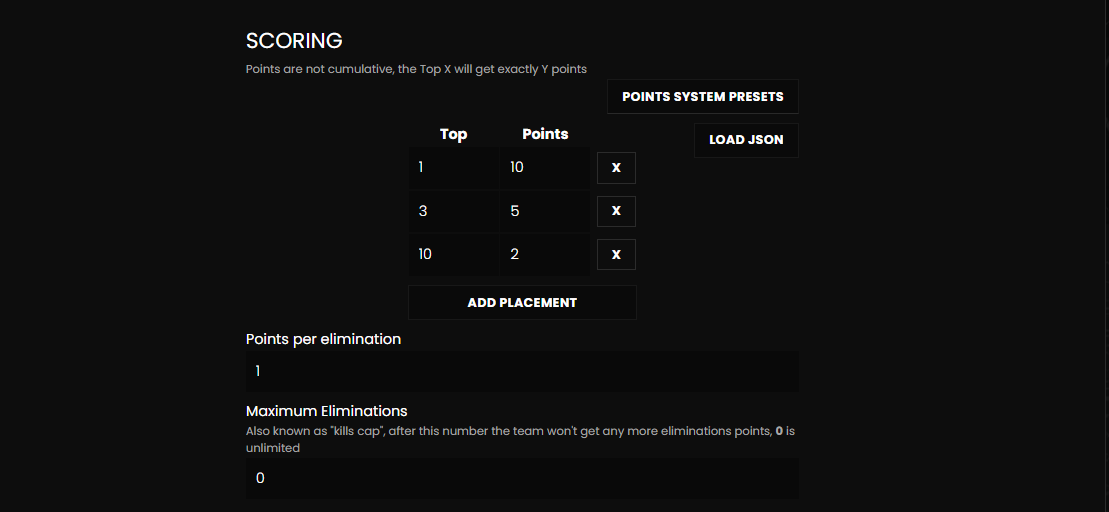
Choose your point system manually or by loading a JSON:
Manually
In the left column, you choose the placement, in the right column you choose the number of points you assign.
Please note that if you fill in top 3 then top 10 leaving a gap, our system will place the number of points from top 10 in the points for placements between top 4 and top 9.
Load a JSON
This button will allow you to import your point system.
JSON Structure
{
  "place_points": {
    "1": 10,
    "2": 5,
    "3": 2,
  },
  "kills_cap": 0,
  "elimination_points": 1,
  "banned_sessions": [],
  "tiebreakers": [
    {
      "src": "points",
      "multiplier": 0,
      "bits": 11,
      "avg": false,
      "reverse": false
    },
    {
      "src": "victories",
      "multiplier": 0,
      "bits": 4,
      "avg": false,
      "reverse": false
    },
    {
      "src": "kills",
      "multiplier": 100,
      "bits": 12,
      "avg": true,
      "reverse": false
    },
    {
      "src": "place",
      "multiplier": 100,
      "bits": 14,
      "avg": true,
      "reverse": true
    },
    {
      "src": "timer",
      "multiplier": 0,
      "bits": 11,
      "avg": true,
      "reverse": false
    }
  ],
  "session_limit": {
    "max": 4,
    "criteria": "start_time",
    "reverse": false
  },
  "prizes": {
    "20": "Qualified for Finals"
  }
}
- Please ensure that the file has a .json extension.
- Please note that points are not cumulative, Top X will get exactly Y points - You must add them up.
Example: You have: Top 1 - +14 points Top 2 - +4 points Top 3 - +2 points
In our system you must write it like this: Top 1 - 20 points Top 2 - 6 points Top 3 - 2 points
Points per Elimination
Choose how many points 1 kill is worth.
Maximum Eliminations
Also known as "Kills Cap", this number defines the maximum number of kills before the system stops counting.
- 0 by default is unlimited
Rewards
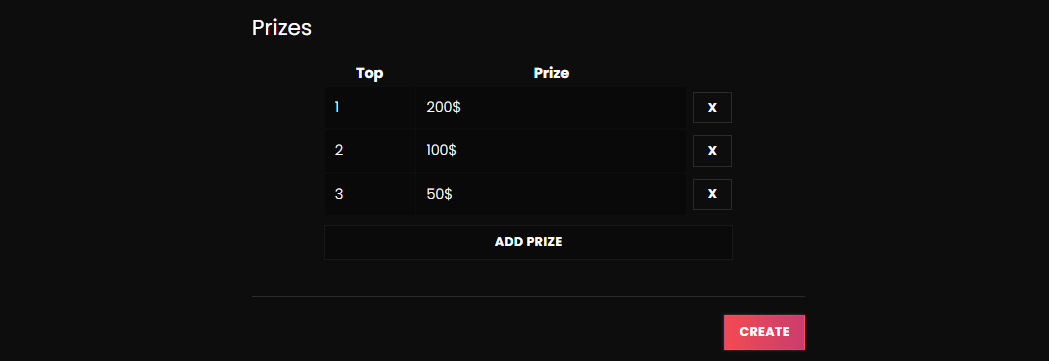
Add a Reward
Adds a line.
Remove a Reward
Removes a line.
| Field | Description |
|---|---|
| Top | Corresponds to the placement that wins the cash prize. |
| Reward | Corresponds to what the player wins. |
- Please note that the "Top" option only accepts numbers compared to the "Prize" option which accepts numbers and letters.
- War Legend takes no responsibility regarding rewards, be careful!